Nothing disrupts a smooth journey like getting stuck at the tollgate due to insufficient funds, which is why keeping track of your Easytrip account is essential for every driver. Whether you prefer using a direct link or the dedicated mobile app, learning how to monitor your RFID balance ensures a hassle-free travel experience. Read on to discover the most efficient methods to stay updated and keep your wheels turning without interruption.
The Importance of Real-Time RFID Management
The Financial and Legal Risks of Low Balance
Entering a tollway with insufficient load stops traffic. It also violates tollway regulations. Regulatory bodies enforce strict penalties for drivers who obstruct traffic flow due to low RFID balance. You face tangible consequences for neglecting your account status.
- Traffic Citation Ticket (TCT) issuance
- Monetary fines starting at ₱1,000
- Confiscation of driver's license
- Mandatory driver re-education seminars
These penalties apply instantly at the booth. A single error delays your trip and incurs costs exceeding the toll fee itself.
Easytrip Network Coverage
Your Easytrip load works exclusively on expressways operated by Metro Pacific Tollways Corporation (MPTC). Memorize these specific roads to avoid payment errors.
| Expressway | Location Context | NLEX | North Luzon Expressway | SCTEX | Subic-Clark-Tarlac Expressway | CAVITEX | Cavite Expressway | C5 Link | C5 South Link Expressway | CALAX | Cavite-Laguna Expressway |
|---|
Balance Verification Methods
Monitor your funds before every trip. Use these official channels to prevent penalties.
- MPT DriveHub App: Link your account for real-time status updates.
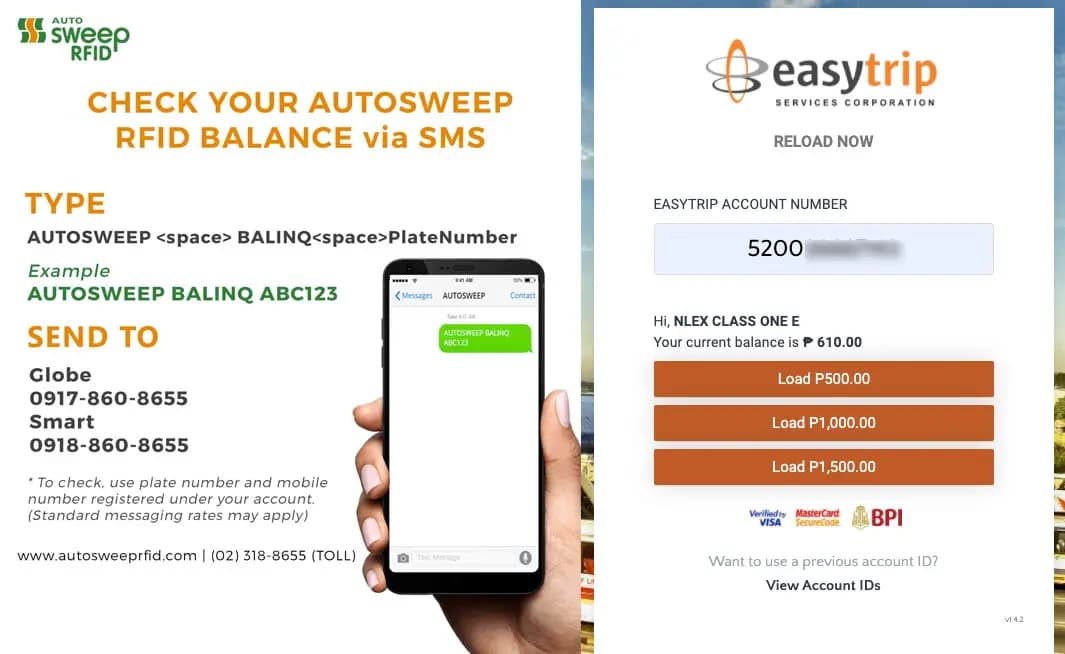
- SMS Inquiry: Text BAL [Space] [12-digit Account Number] to 0919-160-1553.
- Online Portal: Log in to the myeasytrip website to view transaction history.
Reloading Channels
Fund your account instantly through authorized partners. Processing is immediate.
- E-Wallets: GCash, Maya.
- Online Banking: BDO, BPI, Metrobank, UnionBank.
- Over-the-Counter: 7-Eleven, SM Business Centers, Robinsons Business Centers.
- Self-Service Kiosks: TouchPay machines located at gas stations.
Optimize Fleet Operations with Nextwaves
Managing fleet RFID data requires precision. Nextwaves Industries supplies industrial-grade UHF RFID Readers and Tags for enterprise inventory and vehicle tracking. We integrate high-performance hardware with your logistics software for total asset visibility.
Eliminate inefficiencies in your supply chain. Contact Nextwaves Industries to implement robust RFID solutions today.
Method 1: The MPT DriveHub App (Recommended)
MPT DriveHub offers the most reliable method for balance checks in 2026. It connects directly to the Metro Pacific Tollways network. This includes NLEX, SCTEX, CAVITEX, CALAX, and CCLEX. Nextwaves Industries recommends this tool for its accuracy and real-time data integration.
Installation and Registration
Follow these steps to set up your account. You need your 12-digit Easytrip account number.
- Download MPT DriveHub from the App Store or Google Play.
- Open the application.
- Select Sign Up.
- Enter your mobile number and email address.
- Create a strong password.
- Enter the One-Time Password sent to your mobile device.
- Log in to your new account.
Linking Multiple Vehicles
Manage your entire fleet or family cars from one dashboard. You do not need separate logins for each vehicle.
- Tap the Add RFID Account button on the home screen.
- Input the 12-digit Easytrip account number for the specific vehicle.
- Input the specific card number associated with the sticker.
- Assign a name to the vehicle (e.g., "Delivery Van 1" or "Blue Sedan").
- Repeat this process for all additional vehicles.
Monitoring Balance and History
The app displays your current balance immediately upon login. It pulls data directly from the Easytrip servers. This eliminates the delay found in SMS inquiries.
Tap on a specific vehicle card to view Passage History. This section lists:
- Entry and exit points.
- Time stamps for every transaction.
- Toll fees deducted.
- Remaining balance after each deduction.
Enable Push Notifications. This setting sends alerts for low balances. It also confirms successful toll payments instantly as you pass the booth. This feature prevents the "Zero-Balance" trap common with the 2026 "One RFID" system.
| Feature | Benefit | Real-Time Balance | Know your funds before you drive. | Traffic Updates | Plan routes around congestion. | Reloading | Top up directly within the app. |
|---|
Troubleshooting Common Issues
Technical glitches occur. Use these solutions to resolve login or syncing errors.
- Login Failures: Verify your internet connection. Switch between Wi-Fi and mobile data. If the issue persists, reset your password via the "Forgot Password" link.
- Syncing Delays: Pull down on the home screen to refresh the data manually. Close and reopen the app to force a server request.
- Missing Balance: Confirm you view the correct wallet. MPT DriveHub shows Easytrip funds only. It does not display Autosweep balances, even with a unified sticker.
- App Crashes: Update the application. Outdated versions often conflict with newer Android or iOS operating systems.
Nextwaves Industries advises regular audits of your RFID accounts. Combine high-performance Nextwaves UHF hardware for internal logistics with the MPT DriveHub app for external compliance. This ensures total visibility over your transport operations.
Method 2: Web Portal and Quick Inquiry
Access your Easytrip balance directly through a web browser. This method suits users at desktop workstations or those avoiding additional mobile applications. It provides immediate data without software installation.
Using the Quick Balance Inquiry Tool
The Easytrip website hosts a tool for instant verification. This feature requires your 12-digit account number. It demands no password or login credentials.
Follow these steps for immediate results:
- Open www.easytrip.ph on your browser.
- Locate the Quick Balance Inquiry panel on the homepage.
- Enter your 12-digit Easytrip Account Number.
- Click the Check Balance button.
- Review the displayed credit amount.
This tool displays only the current load. It excludes transaction history or vehicle data. Nextwaves Industries recommends this method for fleet dispatchers performing rapid pre-departure checks.
Customer Account Management System (CAMS) Registration
The Customer Account Management System (CAMS) offers comprehensive account data. It serves users requiring Statements of Account (SOA) or detailed trip logs. You must register to access this portal.
Registration Requirements:
- Account Number: Your unique 12-digit ID.
- Card Number: The specific ID printed on your physical RFID card.
- Email Address: A valid email for verification.
- Vehicle License Plate: The plate number associated with the account.
Visit myeasytripcams.easytrip.ph to create your profile. Once logged in, you generate monthly statements. These documents assist in expense reconciliation and tax reporting.
Web Portal vs. Mobile App
Choosing between the web portal and the MPT DriveHub app depends on your operational needs. The web portal favors detailed analysis. The app favors on-the-road speed.
| Feature | Web Portal (CAMS/Quick) | MPT DriveHub App | Data Depth | Full history and SOA download | Recent transactions only | Accessibility | Desktop or mobile browser | Smartphone installation required | Alerts | None | Push notifications for low balance | Speed | Slower login process | Instant view on launch |
|---|
One RFID System Limitations
The "One RFID" initiative unifies the physical sticker. It does not unify the digital wallets. Checking your balance via the Easytrip web portal reveals only Easytrip funds. It ignores Autosweep credits.
Critical Warning:
- Easytrip Wallet: Covers NLEX, SCTEX, CAVITEX, CALAX, C5 Link.
- Autosweep Wallet: Covers SLEX, SKYWAY, NAIAX, STAR, TPLEX.
A positive balance on the Easytrip website guarantees entry only to Easytrip-operated tollways. Verify your Autosweep balance separately to prevent barriers at south-bound toll gates.
Method 3: SMS and Offline Options
SMS Inquiry Service
Data signals fail in remote areas. Use the SMS inquiry service during these network outages. This method requires cellular signal only. It provides a reliable backup for drivers on the road.
Follow this syntax for accurate results:
- Open your messaging app.
- Type BAL followed by a space.
- Enter your 12-digit Easytrip account number (e.g., BAL 520012345678).
- Send the message to 09191601553.
The system replies with your current available balance. Network providers charge ₱1.00 per inquiry. Save this number in your contacts as "Easytrip Balance" for rapid access.
Physical Kiosk Verification
Verify your balance at physical payment terminals. This works well during reloading stops at convenience stores. 7-Eleven CLIQQ machines and TouchPay terminals support this function.
Execute the following steps at the kiosk:
- Select Bills Payment or RFID on the touchscreen.
- Choose Easytrip from the merchant list.
- Enter your 12-digit account number.
- Wait for the system to validate the account.
The screen displays the current balance before asking for payment. Review the amount on the display. Cancel the transaction if you do not need to add funds. This prevents unnecessary reloading.
Customer Service Hotline
Contact the support team directly for urgent account issues. This method suits complex inquiries, lost tags, or dispute resolution. It connects you with a human agent.
- Dial 1-3500 on your mobile or landline.
- Prepare your account number and vehicle plate number.
- Follow the voice prompts to reach an agent.
Standard call rates apply. Agents provide the most accurate status for blocked or suspended tags. Use this option when the SMS service or kiosks fail.
Offline Method Comparison
| Method | Cost | Requirement | SMS Inquiry | ₱1.00 | Cellular Signal | Kiosk (CLIQQ/TouchPay) | Free | Physical Presence | Hotline (1-3500) | Standard Rates | Voice Call |
|---|
Nextwaves Industries prioritizes data visibility across all channels. Accurate balance tracking prevents logistics delays. Maintain sufficient funds to ensure seamless entry at toll plazas.
Common Balance Issues and Fixes
Delayed Load Reflection
You loaded your account. The balance remains unchanged. This delay frustrates drivers. Third-party payment channels process transactions in batches. Apps like GCash, Maya, and online banking portals experience system latency. These delays prevent instant updates to your account.
MPT DriveHub transactions reflect faster than external payment partners. Wait 15 to 30 minutes before reloading. Multiple attempts result in excess balance. Plan ahead. Load your wallet before you start the engine.
Floating Balance vs. Ledger Balance
Users confuse these two distinct metrics. Misunderstanding them leads to insufficient balance penalties. The system treats them differently.
- Ledger Balance: This figure represents cleared funds available for use. The toll system deducts fees from here. This number determines if the barrier opens.
- Floating Balance: This amount includes pending transactions. It covers recent loads not yet cleared or toll fees currently processing.
Focus on your Ledger Balance. Toll barriers rely on this specific number to authorize entry. A high Floating Balance offers no value at the toll gate.
Barred Entry Despite Sufficient Funds
The barrier refuses to lift. You possess sufficient funds. Several technical factors cause this error.
- Signal Interference: Metal-heavy window tint blocks RFID signals. Cut a hole in the tint around the sticker to fix this.
- Damaged Tags: Physical scratches or sun damage degrade the antenna. Replace old tags immediately. Nextwaves Industries recommends high-performance UHF RFID inlays for consistent read rates.
- Wrong Wallet Error: You loaded your Autosweep wallet for an Easytrip lane. The "One RFID" system unifies the sticker. It keeps the wallets separate. You must load the specific wallet for the specific expressway.
Reverse and enter a cash lane if the hardware fails. This prevents traffic buildup and avoids violation tickets.
Resolving Double Deductions
Sensors occasionally read a tag twice in rapid succession. You see two charges for a single pass. Monitor your transaction history regularly to catch these errors.
Follow these steps to recover your funds:
- Log in to MPT DriveHub or the CAMS website.
- Download your Statement of Account.
- Identify the duplicate entry with the exact timestamp.
- Submit a dispute ticket through the app "Help" section.
- Call the 1-3500 hotline for urgent cases.
Support teams verify video footage. They reverse valid errors within 3 to 5 business days. Nextwaves logistics software prevents similar errors in supply chain tracking, but consumer toll systems require manual verification.
Conclusion: Drive Smart, Load Early
Efficient Balance Monitoring Methods
Active management of your Easytrip account prevents penalties and delays at toll plazas. You have three primary methods to verify your load status. Select the method fitting your current connectivity and location.
- MPT DriveHub App: This official app provides real-time balance updates for NLEX, SCTEX, CAVITEX, CALAX, and CCLEX. Enable push notifications to receive instant alerts when your funds drop below the threshold.
- SMS Inquiry: Text BAL [12-digit Account Number] to 09191601553. This service costs ₱1.00 per message. It functions without an internet connection. save this number in your phone for emergency checks.
- Online Portal: Visit www.easytrip.ph or the Customer Account Management System (CAMS) for detailed statements. This tool suits desktop users reviewing monthly expenses.
| Method | Cost | Efficient travel demands accurate data. You possess three primary tools to verify your Easytrip balance. MPT DriveHub offers real-time tracking. SMS inquiry serves drivers without internet access. The official website displays detailed history. Select the method fitting your current connectivity status.
Method RecapUse these specific channels to monitor your funds:
The "One RFID" Wallet DistinctionThe 2026 "One RFID, All Tollways" initiative unifies stickers. Wallets remain separate. You must fund Easytrip and Autosweep accounts individually. A ₱1,000 load on NLEX fails to pay Skyway tolls. This distinction traps many drivers. Monitor both wallets via their respective apps to avoid penalties. The "Load Before You Go" RuleElectronic payment systems require processing time. Adopt the "Load Before You Go" rule. Add funds to your account 24 hours before your trip. This buffer prevents the "insufficient balance" error at the gate. Immediate loading at the toll plaza causes delays and traffic violations. Operational EfficiencyNextwaves Industries delivers intelligent software for supply chain visibility. Apply this same discipline to your personal logistics. Proactive monitoring prevents bottlenecks. Treat your RFID balance as a critical vehicle component. Final ActionStop guessing your balance. Download the MPT DriveHub app immediately. Enable push notifications for low-balance alerts. Verify your funds before you start your engine. Was this article helpful?Related Articles Maximizing Asset Visibility: The Ultimate Guide to Anti-Metal UHF RFID TagsMar 2, 2026  Mastering UHF RFID in Odoo: Hardware, Workflows, and Best PracticesMar 2, 2026  Chainway C72 Comprehensive Review: Specs, Pricing, and Top AlternativesMar 2, 2026  The Ultimate UWB Module Comparison: Prices, Specs, and Use CasesFeb 23, 2026 |
|---|